




There’s so much to stream on Spotify, and the best way to hear those tracks, playlists, and podcasts again and again is to save them directly to Your Library. Previously, you may have used the Heart icon to mark the songs you wanted to save, and the “Add to playlist” icon to add tracks or podcast episodes to your favorite playlist.
Starting today, we’re consolidating the Heart icon and the “Add to playlist” icon into a single symbol: the Plus (+) button. When you hit Plus (+), you’ll be able to save and choose the destination for any song, playlist, or podcast with a simple tap. This upgrade is the latest step in our ongoing work to create a more intuitive experience—all leading to an easier way for you to engage with the music and podcasts you love.
New ways to use Spotify’s integrated Plus (+) button:
- Tap to save: To save a song or podcast episode, tap the Plus (+) button to the right of the song or episode title in the Now Playing view. After your choice has been successfully added to Liked Songs or Your Episodes, the Plus (+) will become a green check. You can change the destination of your saved content by tapping the green check.
- Easily add an entire album to Your Library: Just click the Plus (+) button to add your favorite album, playlist, or audiobook to Your Library. You’ll see the green check once it’s been successfully added.
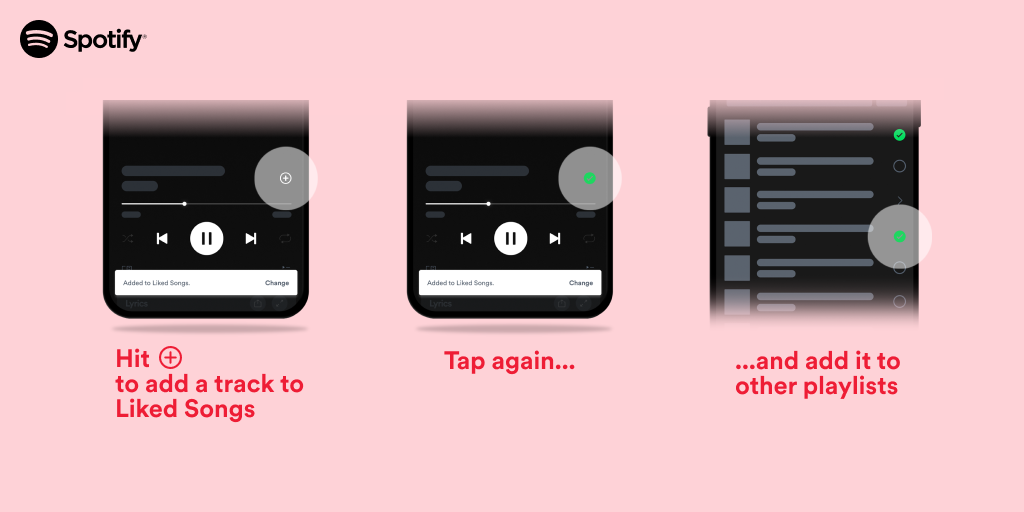
Why we’re upgrading the Plus (+) button
The new and improved Plus (+) button now gives users a more streamlined way to save favorite music and podcasts. Plus, in our user research, we found that the Plus (+) button upgrade helped save time and gave users the ability to add to multiple playlists at once.
We also found that saving songs and podcasts makes users more likely to listen to them again, which means more love for those artists or shows you’ve discovered. So it can do everything the Heart button does—and more! Plus, everything you’ve already saved to your Liked Songs or Your Episodes will still be there.
This feature will begin to roll out to all users globally on mobile (iOS and Android) beginning today and will become available to all Spotify users in the coming weeks. Stay tuned for more updates to help you more easily engage with the music and podcasts you love.
Taken from: https://newsroom.spotify.com/2023-02-27/save-your-favorite-songs-podcasts-and-more-with-spotifys-plus-button/